Imagine: Ravi, a student, 24 years old, residing in Jaipur, and with a plan of changing his career from an accountant to a web developer. He didn’t know anything about coding or have any experience in design, and not much time left after his 9-to-5 job.
After six months, he got his first freelance job, which was creating a fully functional E-commerce website for a local clothing store.
His secret? He developed the skills needed to use AI tools.
This sort of success story is becoming commonplace. What once took years of practice can now be learned in months with the help of AI tools.
Whether you’re looking to learn, analyze, design, or grow your online presence, there is an AI assistant ready to help.
Let’s discuss how these tools can accelerate your growth in technical skills and how you can relate this to real-life scenarios.
The Old Way vs. the New Way of Learning Technical Skills
If you wanted to learn code 10 years ago, then you’d purchase fat books, spend hours in tutorials, and get caught up on errors, only to have no one to support you, and give up before you could actually create anything.
Meet Priya’s story
Priya was interested in automating her routine work reports. With the old method, it would take weeks of study to learn a whole programming language, the rules of syntax, the functions, and then to memorize the weird error messages by themselves.
Rather, Priya told an AI coding assistant about her issue: I have sales data in a spreadsheet. I have to sum up the data daily by region and send a report to my manager with the data.
It didn’t just give her code; it showed her how to do it in a step-by-step manner. It was explained in simpler terms when Priya questioned why we need this line. Whenever she encountered an error, she simply pasted it into the AI assistant. , and the AI tells her how and why, as well as how to correct the error.
Priya finished her working script in just one week. More to the point, she was familiar with how it works to the point that she could make changes when her needs evolve.
This is the new model: Learning by creating real things. AI is your own teacher, 24 hours a day, 7 days a week.
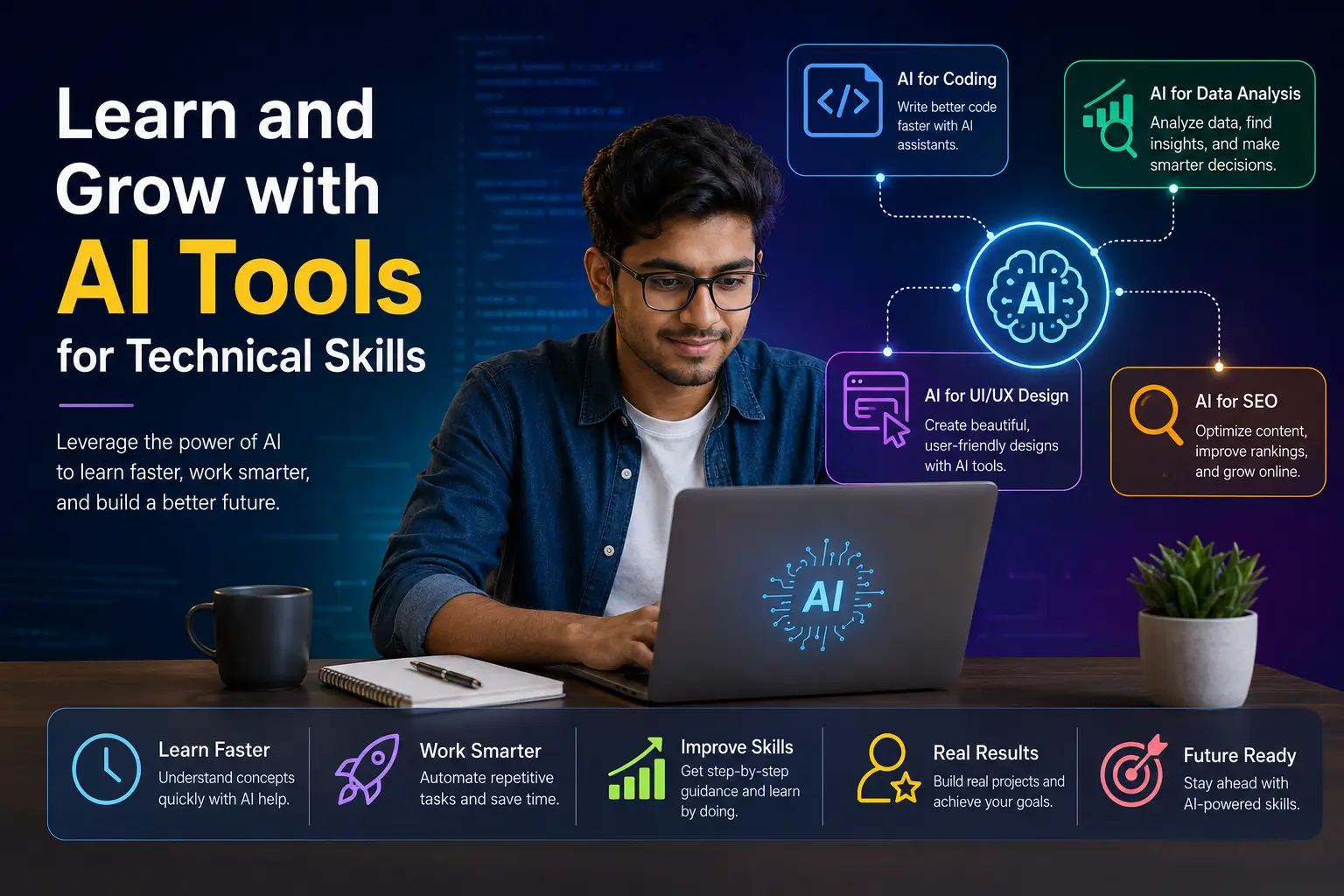
AI Tools for Code and Developers (GitHub Copilot, etc.)
How to get started.
Arjun had always wondered how to create apps, but was confused.
He started using GitHub Copilot, an AI feature that is integrated into code editors and offers suggestions while you are writing code. However, this was the approach that made all the difference:
So, Arjun did not ask AI to write all the things on his behalf. Instead, in clear language, he made comments on small bits, he said.
Design a button that will change color when you click it.
The code is proposed by Copilot. Arjun wasn’t just taking it at face value. Some questions he posed in his follow-up are:
- What does this addEventListener function do?
- Why did you not take a different measure?
- Would you say that something would break if I took away this line?
Each answer became a mini-lesson. In a month, Arjun would be able to guess what Copilot would recommend before it came up. It was at that time that he realized he was indeed learning, and not merely copying.
For Working Developers
Sneha, a three-year software developer, applies AI in a different way. She does not require explanations of simple ideas-she needs to work more efficiently.
Instead of taking two hours to read documentation to work out how to install the payment gateway she is unfamiliar with, she describes how she has configured her system and requests to be informed how to implement it.
The AI tools offer an initial point that is specific to her precise technology stack.
But Sneha is never in a hurry. She says that AI suggestions are similar to code written by a friend, but occasionally by an inattentive colleague. Useful, but you can not merge it without checking.
Her rule: AI to the first draft, your brain to the final version.
Hands-On Advice on How to Learn to Code with AI
Begin with your personal issues. Need to arrange your movie collection? Create a tool to do so. Tired of manually renaming files? Automate it. Personal projects also help in keeping you motivated, as you do care about the end product.
Ask, not do this to me, but, teacher, teach me. The difference between writing a function that sorts names, and explaining why this approach works, and getting fish is the difference between getting fish and learning to fish.
Intentionally break things. After you have a working code that AI provides, intentionally modify the code to find out what breaks and what doesn’t. This develops true knowledge.
Construct a duplication. The first time was with the heavy AI assistance, and the second one with the slight assistance. The gap demonstrates to you precisely what you have learned and what you have to practice.
AI tools for Data Analysis
How to figure out numbers without being a statistician
Deepak operates a small online shop that deals in handmade crafts. Months of sales data had been sitting there in spreadsheets, but he was not sure what to do with it.
He was aware that there were patterns; some of their products sold more during this or that month, some customers were repeaters, so on and so on, but he felt it would have taken a data science degree to extract this information.
He began to work with AI-based analytics solutions that have allowed him to pose questions using plain language.
The question is: What products have the best profit margin?
Show me the customers who had ordered more than 3 times and did not have a purchase in the last 60 days.
“Which is my busiest day of the week?
The AI was used to perform the complicated calculations. However, this is what made Deepak actually learn data analysis: he did not just stop after receiving answers.
When the AI revealed to Deepak that the number of sales on Tuesdays exceeded the number of sales on other days by 40 percent, Deepak questioned: “Why could this be happening? What shall I enquire about?
The AI recommended considering when his social media posts were posted, when his email newsletters were sent, and whether or not he had any external factors associated with Tuesdays.
Deepak found that on Monday evenings, his Instagram posts were getting the same traffic on Tuesday.
This is data literacy, not simply running numbers, but knowing what they signify and what to do about them.
From Confusion to Confidence
Meera, one of the marketing managers, had to report to the leadership on campaign performance. She was provided with data on five platforms, which were in different formats.
Before this, she would spend days handwriting charts, and on many occasions, she did not know whether she was drawing the correct insights or not.
Through the help of AI, she might ask: Compare these five campaigns and tell me which one worked the best, considering the amount of money spent.
The AI summarized the data, computed the cost-per-result of each campaign, and proposed the most understandable way of visualizing the comparison.
However, more precious than the product was the schooling.
Meera enquired: Why did you use a bar chart, rather than a line graph? The AI provided an answer: Bar charts are used to compare discrete categories, whereas line charts are used to show trends between two consecutive dates.
Every report that Meera develops now learns something concerning data visualization and analysis.
Growing Your Data Skills with AI
Begin with questions that you are really interested in. Your own finances, fitness tracking, or hobby statistics are great learning content, as you are interested in the answer.
Secondly, question the findings of the AI. In case it claims that your best customers are in Delhi, check it. Inquire about how it is determined best. This is critical thinking and the heart of data literacy.
Learn vocabulary. When AI talks about the correlation, outliers, or statistical significance, request simple explanations. This vocabulary will enable you to think more specifically about data.
AI tools for UI/UX Design
Design Without Design School
Kavya had the idea to create a mobile application for her food blog, but had no experience in designing applications. She was familiar with the apps that she enjoyed using, such as clean, easy to use, pleasant colors, but had no idea how to make something like that.
She began to explain her vision to the AI design tools: I want a recipe app that is warm and homey, like a grandmother in her kitchen. The user should have an opportunity to view recipes by category, save them, and follow step-by-step instructions to cook.
The AI came up with various design ideas. But Kavya did not merely take one and pass. She asked questions:
Why is it that the navigation is at the bottom, rather than at the top?
The AI described thumb-zone ergonomics, which is more accessible on the phone using a bottom navigation, which is easy to reach with one hand.
Why did you take this shade of orange?
The AI analyzed color psychology: warm oranges create a feeling of appetite and comfort, which is ideal in a food application.
Every design decision turned into an education in the principles of UX. In a matter of weeks, Kavya would be able to look at any application and know why it was created in a specific manner.
From Good to Great Design
Rohan, a freelance designer, has a different use of AI. He is already familiar with the principles of design but uses AI to get there even faster.
When Rohan is asked to create something modern, yet trustworthy, when asked to create something for the financial services website.
Rohan will come up with a few ideas in a short time, use his ideas as a starting point for conversation with a client, and see which direction of his ideas works well with a client.
Rohan clarifies that AI takes care of the speed. The flavor and the opinion are mine; I understand what suggestions will be effective and which will be confusing to users, even though it may look good.
He also applies AI to compare his work with accessibility standards- ensuring that text is readable, colors have enough contrast, and other interactive elements are big enough to fit all users.
Building Design Intuition
- Examine applications that you like
Select three applications that you like to use. Ask AI to give the reasoning behind the design decisions: Why is this button this big?
Why is the information a secret behind a tap? Knowing what is good design makes you have an eye for good design.
- Start with wireframes
Describe the structure before requesting beautiful designs. Screen with a list of items, each displaying a photo, title, and a price, with a filter button at the top. The right structure is more important than the right colors.
- Check on real individuals
AI is able to anticipate usability problems, but nothing is better than seeing a person using your design. It assists you to build; humans assist you to validate.
AI tools for SEO and Content Optimization
Getting Found Online
Ananya started a blog about sustainable living. She authored ardent, well-researched papers. In half a year, she hardly had a readership. Her material was good, but no one could locate it.
She began to use AI SEO tools, not to write her content, but to know what people were searching for and how she could structure her articles in such a way that they could be recommended by search engines.
When she needed to write on the topic of plastic reduction, the AI presented her with:
- What are the particular questions that people pose about this issue
- What are the existing articles that rank high, and what do they entail
- What is lacking that she may fill
It was not just another article titled Ways to Reduce Plastic, but it was specifically written in a way that answered the question that real people were asking, that was in a format that a search engine would favor.
Traffic started growing. However, what was more important, Ananya had a reason to know why it was growing.
She was introduced to such concepts as search intent (what people really want when they type a query), content structure (how to organize the articles to be read by people and to be ranked by search engines), and topical authority (why writing a bunch of related articles helps all of them rank better).
The balance between Optimization and Authenticity
Vikram, an operator of a tech review website, was initially concerned that SEO would result in his writing sounding more robot-like and keyword-stuffed.
Artificial intelligence taught him otherwise. Modern SEO is all about knowing what is desired by the reader and providing it in a clear manner.
When AI recommended that he add a section on battery life when traveling, it was not adding keywords, but rather identifying something that his readers were genuinely interested in learning.
Vikram’s strategy: It is best to write naturally first and then apply AI to detect gaps and opportunities. Do not allow optimization to take the place of an authentic voice.
Learning SEO by practice
- Select one article to optimize
You need not attempt to learn it all at once. Take a piece of content, analyze it with AI, apply recommendations, and monitor the results of the next few weeks.
- Understand the reasoning
When AI tells you to add more internal links, inquire why. Knowledge that internal links assist search engines in knowing how your site is structured and also assist the reader in finding the relevant information they are seeking.
- Study what ranks
On any subject you are interested in, see what appears on the first page of results in the search. Ask AI to tell you what those articles are doing well. Patterns will emerge.
The Foundation Skill: Interacting with AI
All the AI tools rely on a single skill, which is how well you are able to get across what you desire. This is termed as prompt engineering, and this can be the most useful technical skill one can learn.
The Impact of Effective Communication Differences
Take the case of two individuals who request an AI to assist them in creating a website contact form.
Person A: Make a contact form.
Person B says: I need a form to collect name, email, and message to submit submissions to my email.
Then Person A: Receives something generic that may require five rounds of revision.
Person B: He will receive an approximation of what they actually require the first time.
This is not that AI is challenging. It’s about AI not being able to read your mind. The more context and specificity you can give, the better the results.
How can you build this skill
1. Be Specific on the Skills You Want to Become Proficient In
Once folks begin using AI tools, they tend to ask very general questions. Later, they feel frustrated that the answers are also too vague and unclear. The more specific and actionable the objective, the better AI can perform.
So, for instance, rather than type Tell me coding, try to write something like, “I want to create a simple HTML/CSS website that looks good on mobile devices. All of a sudden, the answer becomes more precise and easier to understand.
There’s a time I recall when Aniket was learning SEO. He continually asked random questions such as “how do I rank on Google?” but he did not get the right answers. He later began asking questions such as “How can I make a fitness blog beginner-friendly?” and things finally began to fall into place.
2. Provide AI with information about the situation
AI is a sort of smart assistant that requires direction to navigate properly. The more context, the more complete and relevant the responses will be.
If you just type in “Give me blog ideas,” what will happen? What will happen if you just type in “Give me blog ideas? The answer could be a standard reply.
However, when you find yourself searching for “blog ideas for a beginner fitness website for working women,” the ideas you get are more relevant and realistic.
It is useful for everyone from coding, designing graphics, content writing, to even conducting marketing campaigns. Careful attention to detail aids in better direction for AI and saves much time later in the process.
3. Use examples to get better output
The thing that many of the beginners don’t know is that AI knows the patterns very well. When you give samples of what you want the output to sound like, then the output becomes more natural and closer to your expectations.
For example:
Previously, a lot of my work was marked as AI-generated. Later, I began to include stories and real-life examples. The text immediately came across as more human and natural.
4. Continue to develop the Prompt Step by Step
Most would expect flawless results in the first try, but AI tools are not like that. Typically, the initial answer is only a beginning. When instructions are continually improved naturally, then better results are achieved.
If the information is too technical, request AI to clarify it for you. If a design seems to be too cluttered, instruct it to make a more streamlined design. You can make the final product of great quality by just adding a few small instructions.
A student who was learning Python continued to change his prompts over and over as he wanted to know the logic of the code. He did not just copy and paste it and, instead, continued to ask himself the question, “Why does this work?” until he understood it.
5. Be Clear About Your Restrictions
The better your project is going to be, the better it’s going to be with AI, as long as you explain exactly what limitations or requirements your project will have. For instance, word count, budget, platform, target audience, or deadlines are important factors to consider when creating actionable answers.
For example, rather than just “Create a landing page,” state “Create a simple, mobile-friendly landing page for a startup that has little money to spend. That one additional sentence makes the difference between the whole product and nothing.
Conclusion
With the help of AI tools, not only helps you boost your confidence, but also you can finish your work within minutes. Earlier, when I stepped into a coding career, in my office time, everything I had to do manually, but now my job is to analyse business problems. Because my AI friend is there, who can write code and make websites for me.
However, my suggestion is that you should know your basics well; only then can you use the AI tools better; otherwise, you are doing nothing special for yourself.