Finding the inappropriate AI tools may consume hours of your time.
Picking the correct ones could save you 12x time.
In 2026, AI is helping people in generating material, processing data, automating companies, and making decisions.
As a student, entrepreneur, marketer, or professional, AI tools can now be used to become more productive and experience growth.
If I talk about my personal experience, I am a content writer and copywriter. So with the help of AI. I can handle multiple clients. Because AI not only improves my creativity but also my earning potential.
Not only the content and copywriting department, but you can also make strategies for the business to generate sales with the help of AI tools and much more.
However, in this article, I will explain the best AI tools in 2026 that will increase your productivity.
Why are AI tools important in 2026?
1. AI Executes, not just helps
AI has changed drastically in the past two years.
Example:
Earlier, I had to research a topic, then write the long content.
And now I have to edit it.
Now with tools like Chat GPT and Claude, I write: What are the health benefits of eating green vegetables, and what results will they give me in seconds?
Isn’t it amazing?
2. AI understands multiple formats
AI is an all-rounder; anything you want, it will deliver the result you want.
For example:
You can upload a long PDF, a messy screenshot, a picture of your home, a voice recording, or even an Excel sheet.
Recently, I uploaded the doctor’s prescription, and you won’t believe it gave me the exact suggestion that Dr. gave me just by scanning the prescription.
3. AI works like an unpaid intern
As I told you, whatever you want, it will be delivered to you. I’m saying that AI is an unpaid intern because you can take the benefits as long as you want. You can ask anything or order anything.
For example: Give a prompt to Chat GPT that what are the good options for men above 30 to switch their careers?
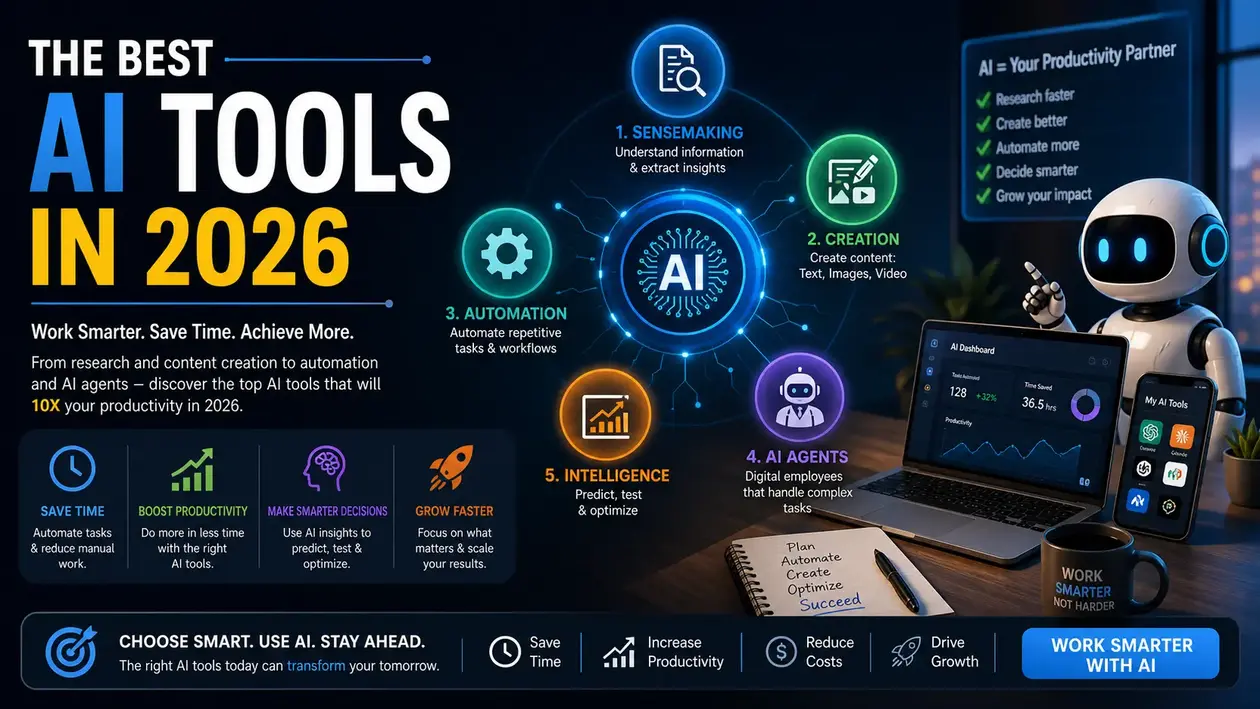
The 5 categories of AI tools(2026 Edition)
1. Sensemaking AI tools
(Understand Information and Extract Insights)
These tools are good when you are dealing with a lot of information and need clarity.
Example:
Recently, my father bought a property, and he wanted to check the property papers.
So I uploaded the property papers to check whether the property has any disputes.
With the help of ChatGPT, I came to know that the property which my father tried to buy was clear.
Tools:
- ChatGPT
- Claude
- Perplexity AI
These tools are widely used in research and analytics.
If your work involves research or product design, you can explore deeper workflows and tools in our guide on AI tools.
2. Creation of AI tools
(Create content: Text, Images, Video)
With the help of AI tools, you can create images, videos, and text also
Example:
I run an e-commerce business, so you need a lot of images and videos while listing a product.
With the help of AI, I generate so many images that are of high quality and generate lots of sales.
For video creators, check the guide on AI tools for video generation.
3. Automation AI tools
(Automate Repetitive Tasks)
Automation Tools reduce manual work and improve efficiency. You will get bored if you do repetitive tasks. So with the help of AI, you can automate your work or your business.
AI can write emails, do data entry, update the CRM, or even schedule your meeting.
Example(Lead generation workflow)
When a lead fills a form:
- AI sends a welcome email
- Then the data is stored in Google Sheets
- The sales team is notified
- CRM entry is created
All this happens automatically because of AI.
If I talk about a big company like IBM, automation reduces its operational costs by up to 30%.
To build advanced automation workflows, explore our guide on AI tools for data integration.
4. AI Agents tools
(Digital Employees that handle Complex Tasks)
AI agents are one of the biggest breakthroughs in 2026. Many influencers make a huge amount of money with the help of AI agents.
They don’t just help-they execute tasks independently.
What they can do:
- Research competition
- Manage emails
- Generate reports
- Organize workflows
Example:
Many businessmen don’t have time to do all the work on their own. So what they do is make their own AI agents. What can surprise you the most is that you can’t predict between an AI agent and a real person.
These tools are heavily used in support and business workflows.
You can explore real implementations of AI tools for customer service automation.
5. Intelligence AI tools
(Predict, Test, and optimise)
These tools help you make better decisions using predictions.
With the help of AI tools, you can predict the user behaviour, identify the risk pattern, optimize the designs, and even you can fix your architecture designs.
Example(Website Optimization)
Upload a landing page-AI predicts:
- What users will click
- Where they might leave
- What needs improvement
For a deeper understanding, explore our guide on AI tools for UX research.
Real-World Examples( Easy to understand)
1. Students.
Nowadays, students can understand the concept better with the help of AI. If they face any difficulty in school while learning, they don’t go to their teacher, as they can ask their doubts to AI.
They can make notes and save them in the PDF format with the help of AI.
2. Teachers
Not only for the students, but AI is also handy for the teachers. With the help of AI, they can improvise their teaching style in such a way that every student can understand.
Moreover, with the help of AI tools, they can create a worksheet, organise a Quiz activity, PPTs, and plan a lesson.
For better understanding, you can check the best AI tools for teachers.
3. Content creators and Social media managers
AI changes the lives of many professions, and one of those is Content creators/Social media managers.
Earlier, they had to work long hours just to make social media calendars for their clients, and now, with a simple prompt, they get the social media calendar for the whole month.
Also, you are also able to get multiple short clips by just inserting a long video. Apart from that, you can generate hashtags, get an analytics breakdown, and also schedule the posting.
The use of AI in modern social media teams has helped to plan, create, edit, repurpose, and publish content on different platforms without having to spend hours in the process of editing it manually.
To get into more in-depth workflows and tool suggestions, go to our AI Tools to Social Media Management guide.
AI tools buying guide 2026( How to choose like a Pro)
The choice of an AI tool in 2026 will be very different from the past years. Thousands of AI tools, overlapping features, and new AI agents are added every month, and the true art of this is not to find AI tools but to find the ones that truly work well in your workflow.
This buying guide will help you to select AI tools like a pro and not spend money on unnecessary tools.
1. Start with what you want to accomplish, but not with the instrument
Instead of the question of Best AI tools, think:
Which of the activities takes up most of my time?
What are my daily activities?
What takes too long without adding value?
Examples:
- When writing time (time-consumer) is excessively long, choose a creation tool.
- When you get stuck in research -→ select a sensemaker.
- When it takes you time to do manual work → choose an automation tool.
- In case you have a lot of things to deal with in your inbox → select an AI agent.
- When you want more intelligent choices to make, choose an intelligent tool.
2. By identifying the problem, first, you will avoid buying tools that you don’t need
The best AI tools in 2026 will be capable of perceiving:
- Text
- Images
- Screenshots
- Spreadsheets
- Audio
- Video
Why this matters:
You need an AI that will read it all when you have to work with several files (including PDFs + screenshots + video).
Example:
A teacher uploads worksheets and voice recordings → AI prepares lesson plans.
A marketer uploads screenshots of analytics → analytics give recommendations and insights based on AI.
3. Seek Integration Capabilities
A great AI application is pointless without integrating with your regular applications.
Checks if the tool integrates with:
- Gmail
- Google Sheets
- WordPress
- Slack
- CRMs (HubSpot, Zoho, Salesforce)
- Social platforms
Why?
You can do it because it is easy to automate when your apps are able to communicate.
Example:
When a person subscribes to your site, AI can automatically:
- Enter them into your CRM
- Send a welcome message
- Schedule a follow-up
- Communicate with your sales team
It is employed when the tool is highly integrated.
4. Compare Pricing Models and Care
AI prices are all over the board in 2016. Look for:
Pay-as-you-go tools
Pay only a fixed amount based on usage (only works when you use it often).
Subscription tools
(creators, students, teachers).
Usage-limited free plans
As recommended test tools
Team licenses
Impeccable in agencies or businesses that involve teamwork.
Always check:
- Monthly limits
- Word limits
- Image/video generation caps
- Workflow automation or restrictions.
- Agent usage limits
One of the tools may seem cheap, but you will discover that you get to use it after 10 jobs.
5. Determine Level of Results (Not Only Features)
You can have a lot of features, but if it’s not useful, it’s useless.
Check:
- Does it sound natural?
- Are the revelations true?
- Is the video well-polished?
- Are the images sharp and can be utilised?
- Will the AI listen and take instructions?
Example:
Two tools can be used to produce videos, and one might be in a position to produce smooth and cinematic videos, while the other would give shaky shots.
Affirm quality before testing.
6. Find good support and society
When there is a good community in a tool, it grows faster in growth and life.
Evidence of a good ecosystem:
- Vibrant Discord/Facebook group
- Frequent updates
- Public roadmap
- Tutorials and templates
- Prompt libraries
- Quickly responding to customer support
These are better aging tools and have acquired new features more rapidly.
7. Assess Check Security, Privacy, and Data Safety
Always verify: When using AI tools, enter sensitive information.
- Data storage policy
- Encryption standards
- Ensuring that your content is utilized to train.
- GDPR, SOC 2, or ISO certifications.
- Two-factor authentication (2FA) and single-sign-on (SSO) options.
There is no use selecting a tool with a dubious privacy policy.
8. Discover Quickly Growing Tools
AI updates are quick. Choose tools that:
- Release updates regularly
- Regularly add new features.
- Stay up-to-date with the market.
- Expand integrations
- Improve models frequently
The tools that are outdated need years to be retired.
Example:
If the tool is only embracing text, it will soon become outdated as it can’t support video.
9. Test the tools for 7 days before paying
Most useful AI tools will offer:
- Free trials
- Limited free plans
- Demo versions
Check using the trial:
- Is the interface user-friendly?
- Will it fit into your process?
- Will it produce an AI output?
- Is it going to save you time?
- Is it a replacement tool for one of your current tools?
If not, don’t buy it.
10. Use Tools which Reduce, not maximize, workload
A terrific AI solution should:
- Simplify your tasks
- Minimize tools.
- Minimize unnecessary work.
- Streamline your processes
- If a tool has too many steps, prompts, or options, it is not adding value.
Shortcut rule:
You can keep doing it on day 1 if it makes your work easier.
Final Tip: Start with a small stack of 2-3 tools
Don’t buy 10 tools.
Start with a stack of a small size:
- 1 Research sensemaking tool
- 1 Content creation tool
- 1 Workflow automation/agent tool
This will give you the right balance of:
- Creativity
- Productivity
- Automation
Without overwhelming yourself.
AI Tools Checklist 2026
An actionable roadmap to empower you to select the appropriate AI tools.
1. Define Your Goal
Ask yourself the following questions before choosing an AI tool:
- What is it that I would like to hurry up?
- What work is the most time-consuming?
- What do I say every day?
- What are the tasks that are boring, manual, or unproductive?
Goals give rise to the correct tools.
2. Select the Right Category.
Identify your needs with the right AI category:
- Analysis and research – Sensemaking Tools.
- Writing, video creation, design → Creation Tools.
- Monotonous processes → Robots.
- Inbox and working processes -> AI Agent Tools.
- Predictions, optimization, testing → Intelligence Tools.
The selection of the appropriate category will avoid misunderstanding and overloading of tools.
3. Check Multimodal Support
The most effective AI tools in 2026 will be able to comprehend:
- Text
- PDFs
- Images
- Screenshots
- Spreadsheets
- Audio
- Video
Multimodal support transforms tools into being more beneficial in various tasks.
4. Review Integration Capabilities
Make sure the tool is compatible with:
- Gmail
- Google Sheets
- Notion
- WordPress
- Slack
- YouTube
- CRM software (HubSpot, Zoho, Salesforce)
The additional integrations translate to a smoother automation and more efficient workflow.
5. Evaluate Output Quality
Should not select tools based on features alone. Assess the quality of the output.
- Is it natural and understandable writing?
- Do videos flow smoothly?
- Are the designs professional?
- Are insights accurate?
- Does the tool adhere to instructions accurately?
In case the quality is not consistent, think of alternatives.
6. Compare Pricing Models
Does the tool provide:
- A free trial
- Monthly limits
- Generation or word caps.
- Restrictions on workflow or automation.
- Extra charges for additional features.
Select a pricing model that best fits your usage, and not the lowest price.
7. Test Reliability
An effective tool must be consistent and reliable.
- Is the tool crashing a lot?
- Do the results agree?
- Is it really time-saving?
- Is the interface user-friendly?
When the initial days appear to be hectic or unpredictable, it may not be the correct choice.
8. Read Privacy and Security Policies
As AI tools can view personal and business data, check:
- Data storage methods
- The use of content in model training.
- Encryption standards
- Security certifications (GDPR, SOC 2, ISO).
- Two-factor authentication is available.
Do not use tools that have ambiguous data policies.
9. Assess Update Frequency
AI evolves fast. Select tools that keep up to date.
- Regular new features
- Model improvements
- Expanded integrations
- Bug fixes
- Transparent roadmap
Stagnant tools are soon outdated.
10. Begin With a Three-Tool Stack
An easy and convenient configuration for the majority of users:
- A sensemaking research tool
- A single object of creation.
- A workflow automation/agent tool
This takes the majority of tasks that occur on a day-to-day basis without burdening you.
Conclusion
In 2026, AI tools are not a choice anymore, but an essential part of how individuals learn, design, automate, and scale their work. Since the process of research can be simplified, since businesses can be automated, and since it is possible to predict user behavior, AI is involved in nearly every digital activity.
It is not about using all the tools that are out there but about selecting the appropriate ones that suit your objectives, your workflow, and your daily routine.
Any person can create a smart, efficient, and highly productive system around his or her work using the five core categories: Sensemaking, Creation, Automation, AI Agents, and Intelligence.