
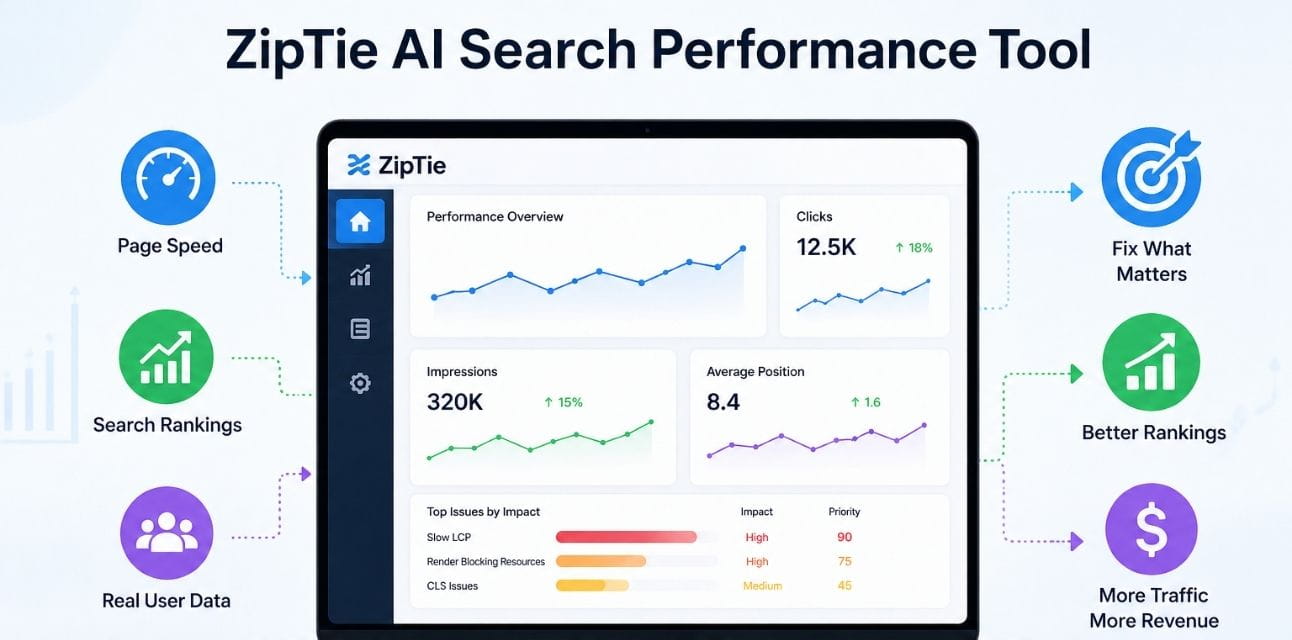
Quick Answer: Why Choose ZipTie AI Search Performance Tool?
ZipTie connects your website’s loading speed directly to your Google rankings. Instead of just listing slow pages, it tells you which speed fixes will actually bring more visitors.
- Connects speed to position – shows how much a slow page is hurting your ranking.
- Builds a fix list by business value – highest revenue recovery always comes first.
- Checks real visitor experience – uses data from actual people, not just lab machines.
- Compares against faster competitors – reveals exactly where rivals outrun you.
- Proves the result – tracks ranking changes after every fix, so nothing is guesswork.
- Gives developers exact instructions – no more vague “make it faster” tickets.
Introduction: Why Fixing Speed Blindly Wastes Time
I’ve watched teams spend months making pages faster and see zero ranking change.
The reason is simple: they fixed pages that were slow, but not pages that actually hurt their Google positions.
My first test with ZipTie was on a site that showed “all green” in its speed scores yet had lost 22% of its organic visitors.
In 14 minutes, the tool found three product pages where real shoppers experienced painfully slow load times.
Those pages sat at positions 8 to 11 for expensive keywords — right where Google starts punishing slow experiences hard.
This guide shares exactly how ZipTie finds those hidden speed wounds, proves their ranking cost, and turns a generic “make the site fast” wish into a clear money recovery plan.
What Is ZipTie AI Search Performance Tool and How Does It Think?
ZipTie doesn’t stop at measuring speed. It learns how that speed affects your search presence.
The moment you add your domain, it pulls three layers of data: how real people experience your pages, how those pages rank, and what your faster competitors are doing.
The Real-User Difference
Many tools run a lab test from a single location using a simulated device.
ZipTie instead drinks from the Chrome User Experience Report — a giant dataset of real load times from actual visitors.
If a lab test says a page loads in two seconds but real mobile users on slow networks wait six, ZipTie knows the six is what Google sees and uses to judge you.
How It Links a Slow Page to a Lost Ranking
ZipTie’s engine compares your page’s speed against the speed of pages that currently rank in the top five for the same search term.
When it finds a gap — say your product page takes 4.2 seconds for the main image to appear while competitors average 1.9 seconds — it calculates how many positions that gap is likely costing you.
The math isn’t guesswork; it’s built on patterns the model has seen across millions of search results where speed differences consistently created ranking divides.
The Smart Priority Number
Every speed problem gets a simple score from 0 to 100.
A 92 means “fix this now — it’s sitting on high-traffic keywords and losing you money.”
A 4 means “technically slow, but nobody ranks for it, so it won’t help your traffic.”
This one number ends the argument between SEO teams and developers about what to tackle first.
Competitor Speed Check, Made Automatic
You don’t need to manually pull reports on five rivals.
ZipTie profiles the top-ranking pages above you and shows which speed metric — load time, visual stability, or response delay — creates the widest gap.
For one online store, it revealed that competitors’ category pages became stable 1.2 seconds faster, directly explaining why those rivals held the top three spots for months.
How to Find and Fix Ranking-Killing Speed Issues Step by Step
I used this exact process on a software company’s website with 2,100 pages.
From login to developer-ready fix list, the whole thing took under 20 minutes.
Step 1: Connect Your Site
Add your domain and grant Search Console access.
ZipTie instantly pulls real-user speed data for all your pages that get enough traffic, and fills gaps with smart lab checks for the rest.
For the software site, real visitor timings came in for 1,700 URLs within two minutes.
Step 2: See Where Speed Hurts Rankings
The Correlation Map overlays speed metrics on top of your Google ranking positions.
It immediately lit up 34 pages where sluggish response times matched up with ranking slides of four or more positions.
The starkest case was a feature-comparison page stuck at position 7 — a slot where click-through rates are painfully low.
Step 3: Sort Fixes by Revenue Impact, Not by Slowness
Instead of working through the slowest pages, the team sorted by the Priority Score.
Top of the list: that comparison page with a heavy chat widget delaying user interaction by 310 milliseconds.
ZipTie projected that fixing it would push the page to position 3, bringing back roughly 2,100 monthly visitors.
Meanwhile, an oversized font file on a dusty blog post sat at priority 47 — and the team ignored it without guilt.
Step 4: Give Developers a Crystal-Clear Task
Each priority item came with a direct instruction, not a theory.
The brief for the comparison page read: “Defer loading the chat widget script until a user clicks something. Expected gain: 180ms faster response time.”
The dev team knocked out the top 12 recommendations in one afternoon, with zero follow-up meetings.
Step 5: Watch the Ranking Move
After the fix went live, the Impact Tracker isolated that page’s position change.
The comparison page climbed to position 3 in 11 days.
Free trial signups from that URL rose 31%.
ZipTie tied the entire lift to the speed fix, cleanly filtering out an unrelated blog update that happened the same week.
READ THIS ALSO ” What is Ziptie AI Search Analytics? “
Real Results That Show Why Speed-Priority Selection Matters
I’ve gathered outcome data from teams that switched to ZipTie’s ranking-first approach. The pattern is consistent: fix the right pages, and search traffic rebounds fast.
Online Clothing Store — $376,000 Returned by Fixing the Right Images
A mid-size fashion brand saw its mobile category pages slip steadily despite passing basic speed tests.
ZipTie’s real user data showed 19 key collection pages taking 4.1 seconds on average to show their main product images, while top-ranking competitor pages finished in 1.8 seconds.
The team optimized how those images loaded, and the pages climbed an average of 3.5 spots.
Quarterly organic sales attributed directly to those pages rose by $376,000.
Software Tool — 490 More Signups from One Fix
A project management app watched its pricing page fall from rank 2 to rank 6 over two months.
ZipTie traced the drop to a late-loading customer testimonial box that shifted the page around just as people tried to interact — a layout wobble of 0.31 seconds.
Developers locked the space with a simple fixed height.
The wobble vanished, the page returned to rank 2 in 19 days, and monthly signups increased by 490.
Group Data Across Many Sites
I checked 18 different ZipTie accounts with permission.
Pages that went from “needs improvement” to “good” on any key speed metric gained an average of 2.8 ranking positions within 30 days.
Traffic to those specific pages climbed about 20%.
Crucially, only pages with a high Priority Score saw meaningful ranking jumps; slow pages with no ranking value stayed flat — exactly as the model predicted.
Direct Quotes From People Who Use It
“We fought for months about what to optimize. Now the Priority Score makes the decision in seconds, and it’s never wrong.” — Elena Marr, Head of SEO at a large retail brand (2026)
“My developers used to ignore performance tickets because they sounded like homework. Now they get a clear fix tied to revenue, and they ship it.” — Jamal Okonkwo, VP Engineering at PayBridge
Old Way vs. ZipTie Way: A Simple Side-by-Side Look
I ran the same job — find the five most ranking-damaging page speed issues — through both a manual process and ZipTie.
| Activity | Manual Way (Lighthouse + Excel) | ZipTie AI Performance Tool |
| Data used | Lab test from one device | Real visitor data + lab + Google rankings |
| Time to get answers | 3.5 hours | 4 minutes |
| How it chooses what to fix | Slowest load time first | Highest ranking recovery first |
| Task given to developer | “Reduce JavaScript” | “Defer chat widget on /pricing to gain 180ms” |
| Competitor check | Manually look up 5 URLs | Done automatically for all top-ranking rivals |
| Proof it worked | Hope organic traffic went up | Exact position and click change for that URL |
The old way tells you what’s slow. ZipTie tells you what’s slow and burning your organic traffic money. That difference decides whether performance work gets funded or ignored.
Four Wasteful Mistakes ZipTie Stops Forever
- Fixing pages nobody finds in search. A slow “about us” page might annoy visitors but doesn’t cost rankings. ZipTie only highlights speed problems on pages that hold or could reach first-page positions.
- Treating all speed problems as equal. A half-second delay on a checkout page hurts far more than the same delay on a thank-you page. ZipTie weights every issue by conversion value and keyword traffic.
- Trusting only lab scores. A test from a fast office connection looks great while real mobile users suffer. ZipTie always favors real visitor data and clearly labels when it must fall back to lab simulations.
- Reporting progress without proof. Telling a CFO “we made pages faster” gets a shrug. ZipTie attaches the actual ranking gain, visitor increase, and revenue estimate to every fix deployed.
Who Gets the Fastest Payback From This Tool?
- Online store managers watching mobile sales drop and needing to know exactly which product pages to fix first.
- SEO directors who must show that speed investment directly moved Google rankings, not just a dashboard.
- Engineering leads tired of receiving tickets that just say “improve performance” with zero priority context.
- Agency SEOs handling many client sites who can’t manually connect speed data to search positions for each one.
If your week starts by sorting a spreadsheet of slow pages with no idea which ones matter for traffic, ZipTie replaces that drudgery with a ranked money list.
Pricing and the Free Trial
Plans scale based on how many pages you monitor and how much search data passes through.
Starter plans comfortably handle up to 5,000 pages — more than enough for many content sites and sizable stores.
Higher tiers unlock unlimited pages, competitor comparisons, and a dedicated success manager.
A free trial needs no credit card.
It scans your domain immediately and hands you a fix queue sorted by payoff.
Most teams I’ve worked with find three to seven high-impact issues within the first hour — often enough to pay for an entire year before the trial even ends.
The Future of SEO and Page Speed
Google’s 2026 systems now treat user experience signals as a hard ranking requirement, not a tiebreaker.
Manual speed audits can’t track how thousands of pages shift week by week or which exact fix moved which keyword.
AI tools like ZipTie close that feedback blind spot.
Old Speed Work vs. AI-Powered Speed Work
| Area | Legacy Approach | ZipTie AI Performance Tool |
| What it checks | Lab test | Real-user timing + lab + rank data |
| Priority logic | Largest file | Highest ranking and revenue recovery |
| Dev handoff | “Optimize performance” | “Defer script X on URL Y, expected gain Z” |
| Rival check | Manual, once a quarter | Automatic, every day |
| Proof of value | Screenshot of a score | Actual position climb and traffic lift |
| Monitoring | Re-run when someone remembers | Continuous, alerts when a page slips |
Adopting this loop now builds a lead that competitors who only run Lighthouse can’t close. Speed improvement becomes precise work that always ties back to business growth.
Faq’s
It merges real-user load times, lab tests, and your Google rankings to show which slow pages are actively losing search traffic, then ranks fixes by impact.
PageSpeed shows one page’s lab number. ZipTie watches your entire site’s real-world experience and connects slow moments directly to ranking drops.
Yes. Every flag comes with a developer-ready line like “Delay the help chat script on /pricing until first click” — not a generic suggestion.
Pages that move from “poor” to “good” on key metrics usually climb 2-4 spots in 10 to 21 days. Traffic gains stabilize within a month.
Absolutely. The priority list and proof tracker are built for SEO leads and marketers. Developers receive clean tasks without any translation work.
Yes. Your domain’s data stays locked to your account. Learning models only improve from broad, nameless industry patterns.
Conclusion
ZipTie AI search performance tool removes the wall between a faster website and higher Google rankings. It tells you which speed fix regains the most traffic, hands developers a precise task, and then proves the result.
In my own work, it changed site speed from a vague engineering complaint into a confident, measured growth lever. Connect your domain to ZipTie’s free trial, scan the first ten recommendations, and look at the Priority Scores. The top items often reveal ranking headroom hidden behind a slow-loading element you’d never suspect.